


Mint Gaming
4.052.00 Reviews
App Specs
- Version
- 2.2.33
- Updated On
- License
- Free
- Downloads
- 10,000+
- Developer
- ECL Entertainment
- Categories
- Lifestyle
- Platform
- Android
Screenshots


 Analysis by AppCompare
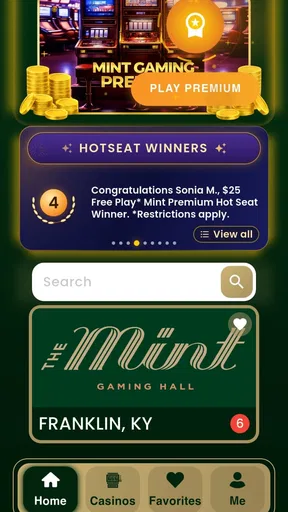
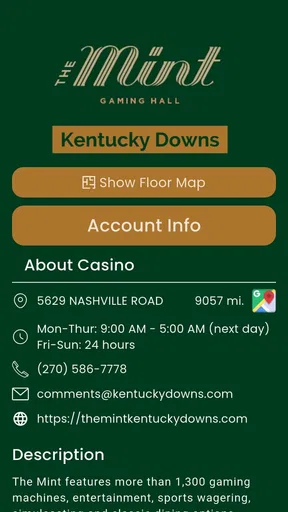
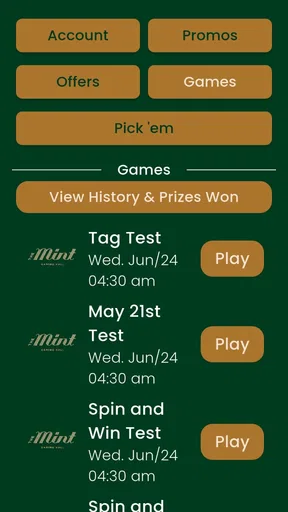
I used Mint Gaming as a planning companion for a gaming getaway rather than as a game itself, and that distinction matters from the first tap. It is a free lifestyle app from ECL Entertainment that brings together gaming destinations, hotels, dining choices, and available offers in one place. I found its strongest appeal in shared planning: one person can explore the gaming side of a trip while another checks where to stay or eat without jumping between several unrelated apps.
The app is aimed at adults, carries a Mature 17+ content rating, and feels most appropriate for people organizing an evening, weekend, or larger trip around a gaming venue. It is not a replacement for a general travel planner, a hotel-booking service, or a social game. Instead, it works as a focused window into the Mint Gaming experience and the surrounding visit. My overall impression is positive, but I would install it with a clear idea of what I want to coordinate, because its value depends heavily on whether the destinations and offers match my plans.
How it works when several people share the planning
A realistic household scenario would be a couple or group of friends deciding how to spend a weekend. One person may care mainly about the casino or gaming floor, another may want a comfortable hotel, and someone else may be focused on dinner. In that situation, Mint Gaming is more useful than opening a general search engine and trying to connect separate results manually. The app gives the trip a central starting point, so the group can discuss the same destination instead of relying on screenshots from different services.
I would use it before the trip, not only when already at the venue. Browsing the available hotels and dining options first helps turn a vague idea into a practical plan. I can compare the overall shape of the visit: whether the destination suits an overnight stay, whether dining is part of the evening, and whether an offer changes the timing or spending decision. That makes the app a planning tool as much as a discovery tool.
Its shared-device usefulness is fairly straightforward. If a household tablet or a phone is passed around, each person can look through the same destination information and make suggestions. That is convenient for coordination, but it also means the app should not be treated as a private account space by default. I would avoid leaving personal account details, payment information, or any sensitive session open on a device used by other people. The app may help a group choose where to go, but household members still need to agree on who is responsible for reservations, purchases, and final decisions.
One practical workflow worked better for me than casual browsing. I first narrowed my attention to the destination, then checked lodging and dining before looking at offers. Starting with promotions can make a trip seem attractive before I understand the basic cost and logistics. By checking the core visit first, I could judge whether an offer was genuinely useful or merely a reason to spend more time or money there. The best use of Mint Gaming is as a coordination layer, not as the sole source of truth for an entire trip.
What to settle before handing over the phone
When more than one person uses the app, I recommend setting simple boundaries before browsing. Decide whether the goal is a gaming visit, a hotel stay, a meal, or a combination. Without that decision, the group can drift from planning into impulse browsing, especially when offers appear alongside entertainment and dining choices.
Worth Reading Before You Choose

Flipboard Shows What News Apps Must Do Beyond the Feed

Switching to Android Auto Means Rethinking Your Driving Routine

Google Calendar Makes a Crowded Week Easier to Manage

Ludo King Makes the Most of the Minutes Between Plans

Baby Panda World Brings Quick Play to Modern Phones, but Its Game Library Feels Busy

ESPN’s Live Game View Makes Following Close Games Easier
I would also separate research from commitment. Looking at a hotel or offer together is harmless planning; entering payment details or accepting a purchase should be handled by the adult who has agreed to manage the booking. This is particularly important on a shared device, where another person may pick up the phone later and see an active session. Mint Gaming is convenient for showing options around a destination, but convenience should not replace ordinary account and payment discipline.
The app is free to install, while in-app purchases range from $1.99 to $99.99 per item. That does not make every use costly, but it is a useful reminder to treat promotional content carefully. I would not let a child or casual guest explore it without supervision, and I would never assume that an advertised offer automatically represents the cheapest complete trip. The right habit is to check the total plan, including travel, lodging, meals, and any separate gaming budget, before deciding.
Another boundary concerns expectations. A person opening Mint Gaming may expect a full travel itinerary, live trip management, or a game to play. I would explain that it is a lifestyle app centered on gaming destinations and related hospitality choices. That short explanation prevents disappointment and makes the shared session more productive. It also helps someone who is not interested in gaming understand why the hotel and dining sections may still matter to them.
Coordinating a visit without mixing everyone’s priorities
Groups often disagree because they are solving different problems. The gaming enthusiast wants access to the venue, the hotel-focused traveler wants comfort and convenience, and the person organizing dinner wants a suitable meal at a sensible time. Mint Gaming can put those interests in the same conversation, but it cannot make the decision for the group. I found it most helpful when each person stated one priority before anyone started comparing options.
A useful approach is to create a simple order of decisions. First choose the destination. Next decide whether the visit is a day trip or an overnight stay. Then consider dining, followed by offers. This order reduces the chance that a discount becomes the main reason for choosing a destination that does not suit everyone. It also makes the app easier to use on a shared screen because the group is evaluating one question at a time.
The app can be especially handy for a last-minute discussion at home. Instead of sending several people to search separately, one person can hold the phone while others react to the available choices. I would still record the final plan elsewhere, such as in a shared calendar or message thread, because a discovery app is not necessarily the best place to track who is driving, what time everyone is arriving, or who has confirmed a room.
That separation is one of the more important trade-offs. Mint Gaming reduces the number of places I need to browse while choosing a destination, but it does not replace the broader coordination tools I already use. A calendar is better for schedules, a map is better for route planning, and a dedicated booking service may be better when I need a detailed reservation record. The app earns its place at the beginning of the process, where the group is deciding what kind of getaway it wants.
Adult context, trust, and shared-device habits
The Mature 17+ rating is not a minor detail here. The app’s subject matter is connected to gaming entertainment and adult-oriented hospitality, so I would not present it as a family leisure app for younger children. A shared household device does not change that age context. If teenagers use the same phone or tablet for unrelated reasons, I would keep the app out of casual browsing sessions and make sure an adult handles any purchase or booking activity.
I also see a trust issue that is easy to overlook. A group may share a device, but that does not mean everyone should see the same personal information or make decisions under another person’s account. Before passing the phone around, I would close any account area, remove saved payment details if applicable, and avoid leaving an unfinished transaction on screen. These are ordinary precautions, yet they matter more when the app is being used to organize a real-world visit.
Mint Gaming is better suited to adults who already understand their own limits and can discuss spending openly. It can make offers and destinations easier to discover, but it should not be used to pressure a hesitant household member into joining a gaming trip. I would also avoid framing a discount as a reason to increase a budget. The app supports planning; responsible decisions still come from the people using it.
For a trusted group of adults, this focus is an advantage. The app does not need to pretend to be a general family organizer. It speaks to a particular kind of outing, and that makes the hotel, dining, and offer information more relevant to the people who are actually considering such a trip. For households with children, however, I would keep it as an adult-only planning tool rather than a shared entertainment app.
Performance, access, and the everyday experience
The current version is 2.2.33, and the app supports Android 7.0 or later. That gives it a fairly broad Android reach, including devices that are not recent. In my experience, the practical question is less about having the newest phone and more about whether the device is comfortable for comparing several parts of a trip. A small screen can make group planning awkward, especially when people are standing around it and trying to remember which option they preferred.
Mint Gaming has a 4.0 average from around 140 ratings, with over 50 written reviews, and it has passed 10,000 installs. Those figures suggest a modest but established audience rather than a universally adopted travel platform. I would read that as a reason to judge the app by its fit for my destination, not by popularity alone. If the Mint Gaming locations are relevant to my plans, the focused approach may matter more than a large user base.
The free entry point is helpful because I can explore the app before deciding whether it belongs in my travel routine. The in-app purchase range means I would pay attention whenever an offer leads toward a transaction. I would compare the final value with ordinary hotel, dining, and entertainment alternatives rather than assuming that an in-app promotion is automatically the best deal. This is also where a second device can help: one person can inspect the app while another checks the wider market independently.
Compared with a general travel app, Mint Gaming feels narrower but more relevant for a gaming-centered getaway. A broad travel service usually gives me more destination types, transport choices, maps, and independent reviews. Mint Gaming is more appealing when I want the gaming venue and nearby hospitality choices considered together. Compared with a casino’s standalone website, it may be more convenient for browsing a complete outing, while the dedicated site may be preferable for detailed venue rules, account management, or final booking information.
That distinction determines who should skip it. I would not recommend installing it for someone looking for a casual mobile game, a universal hotel search, or a complete family vacation planner. I would also skip it if the trip has no connection to the destinations it covers. In those cases, a conventional travel app or the venue’s own official channel is likely to be more efficient.
Small planning insights that make the app more useful
My first tip is to treat offers as the last filter, not the first. An offer can be valuable only when the destination, date, room needs, and dining plans already make sense. Checking the basic visit first gives the promotion context and reduces impulse decisions. This is a simple change, but it makes the app feel more like a planning assistant and less like a stream of tempting possibilities.
My second tip is to give every person in the group a specific question to answer. Instead of asking everyone to browse everything, have one person inspect lodging, another review dining, and another consider the gaming destination. Then compare conclusions. This avoids duplicated scrolling and exposes trade-offs earlier, such as choosing a convenient hotel that leaves fewer dining choices or selecting a meal that does not fit the planned schedule.
My third tip is to use the app for discovery and a separate trusted channel for confirmation. Once the group has chosen a destination, verify the final details before spending money or traveling. I would especially do this when an offer affects the budget or when a household member is relying on the plan. Mint Gaming can shorten the research stage, but responsible coordination still requires a final check by the person making the booking.
A fourth useful habit is to keep the app’s role visible to everyone sharing the device. If one person thinks it is a booking tool and another thinks it is only a directory, misunderstandings are likely. I would say out loud whether we are browsing, comparing, or ready to act. That small distinction protects against accidental purchases and keeps the session focused.
My household verdict on Mint Gaming
After using it as a shared planning tool, I see a clear, limited strength: it brings gaming, lodging, dining, and offers into one focused experience for an adult getaway. That focus makes it more useful than a generic lifestyle app when the destination is already part of the plan. I liked being able to discuss the whole shape of a visit instead of treating the gaming venue, hotel, and meal as unrelated searches.
The limitations are just as clear. It is not a complete itinerary manager, not a universal hotel comparison service, and not suitable as a children’s entertainment app. Shared-device use requires care around account boundaries, payment decisions, and the Mature 17+ context. I would also resist making an offer the center of the decision, since the best value depends on the complete trip rather than one highlighted opportunity.
For an adult household or group of friends considering a Mint Gaming getaway, I think the free download is worth trying before planning elsewhere. The app has enough focus to make destination discussions easier, while its modest audience and specialized purpose mean it will not be useful for everyone. I recommend it when you want to coordinate a gaming-centered visit; I would choose a broader travel tool when the trip needs wider coverage or more detailed itinerary control.
In short, Mint Gaming works best as the first shared screen in the planning process. Use it to explore the kind of visit you want, divide the research between adults, and evaluate offers only after the destination and budget are clear. Used that way, it is a practical lifestyle companion with a sensible role in a household: helpful for discovery and discussion, but not a substitute for judgment, confirmation, or responsible spending.
Pros
- Simple interface makes browsing games and gaming content easy.
- Offers a focused space for discovering new gaming-related content.
- Lightweight design helps the app feel responsive on compatible devices.
- Useful for users who prefer gaming content in one dedicated application.
- Regular content updates can keep the experience feeling fresh.
Cons
- Content quality and availability may vary depending on your region.
- Some features may require a stable internet connection to work properly.
- The app may feel limited for users seeking advanced gaming tools.
- Notifications could become distracting if enabled without customization.
- Compatibility and performance may differ across Android and iOS devices.
FAQs for Mint Gaming
What is Mint Gaming, and what can I do with the app?
Mint Gaming is a mobile gaming platform designed to give players access to a selection of games, gaming-related content, and account features in one place. Depending on your region and the current version, the app may include game discovery, player profiles, rewards, events, or other interactive tools. The available experience can vary by device, location, and updates, so check the store listing before downloading.
Is Mint Gaming free to download and use?
Mint Gaming can generally be downloaded without an upfront purchase, but some games, features, virtual items, subscriptions, or promotional offers may involve additional costs. Before confirming a payment, review the price, renewal terms, and refund conditions shown through Google Play or the App Store. Parents should also check device purchase restrictions if children will be using the application.
Does Mint Gaming require an account or personal information?
Some parts of Mint Gaming may be available immediately, while other features can require registration or signing in with an existing account. You may be asked for information such as an email address, username, or basic profile details. Read the app’s privacy policy before creating an account, and avoid sharing unnecessary sensitive information. Account requirements can change after updates.
Can I play Mint Gaming offline, and what devices does it support?
Offline availability depends on the specific games and functions included in your version of Mint Gaming. Browsing, synchronization, online competitions, rewards, and multiplayer features usually require an internet connection, while certain individual games may work offline. The app is intended for compatible Android and iOS devices, but performance depends on operating-system version, storage, memory, and hardware.
Is Mint Gaming safe for children and does it contain advertisements or in-app purchases?
Parents should review Mint Gaming’s age rating, privacy information, advertising practices, and payment options before allowing children to use it. Gaming platforms may include advertisements, chat or social features, third-party links, and in-app purchases, depending on the region and content available. Use parental controls, disable unauthorized purchases, and supervise online interactions to create a safer experience.


